

Author: Michael Faraday | Technical Director at ZEEHOO, with deep expertise and extensive experience in wireless charging technology.
Table of Contents
1. Raised Magnetic Ring Works With More Than Just iPhones
2. 25W Qi2 Wireless and 45W Wired With Real Test Numbers
3. Pass-Through Charging and Three-Device Support
4. Hardware Details That Show Thoughtful Design
5. Semi Solid State Battery Is the Right Direction
We're excited to share this hands-on review from YouTuber Stefan Zanev!
Stefan approaches power bank reviews with a level of detail that most reviewers skip. He tests charging speeds in 15-minute increments, checks pass-through charging, verifies magnetic strength, and even looks at certifications. When someone with that methodology spends a full video on the ZEEHOO MagAir 10K, the details that emerge are worth paying attention to.
Raised Magnetic Ring Works With More Than Just iPhones
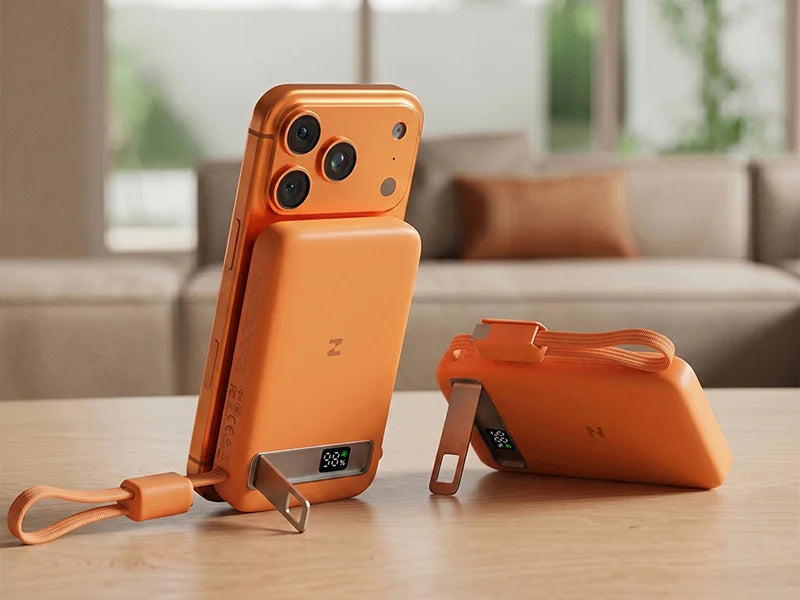
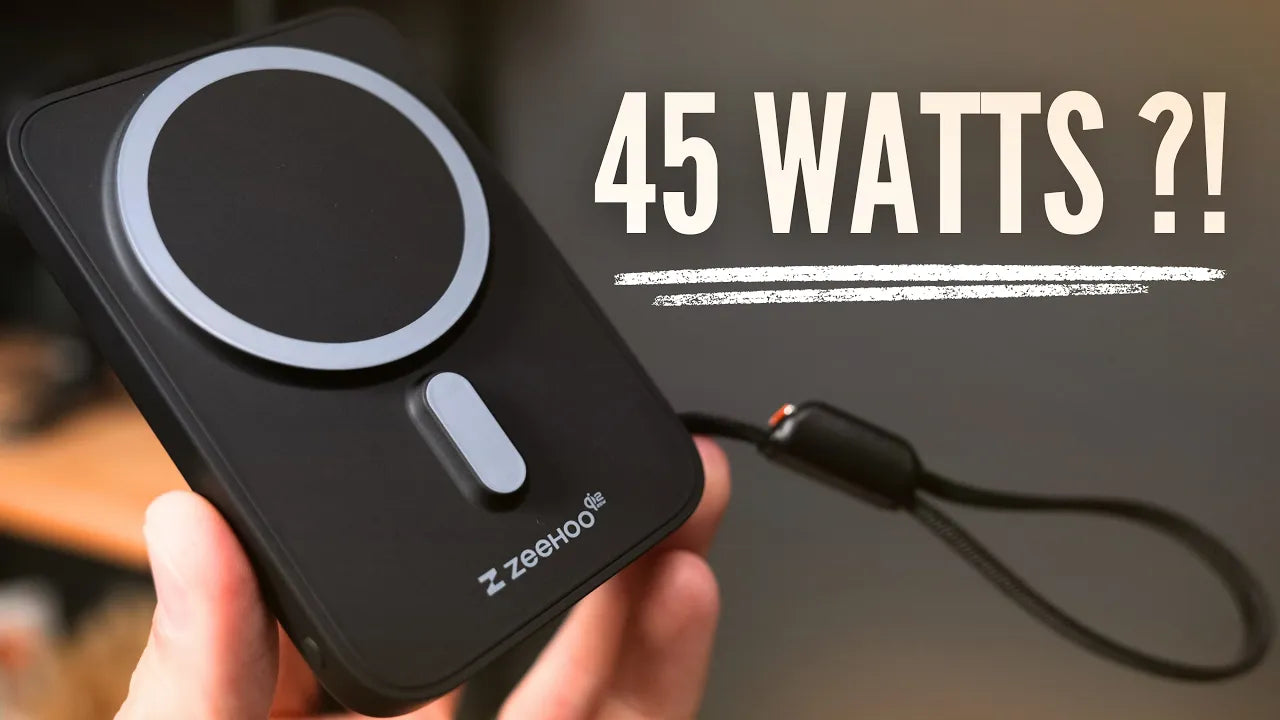
The first thing Stefan calls out is something he has not seen on other power banks. The magnetic ring and alignment magnets on the MagAir sit higher than the body of the device itself. This raised design means the power bank accommodates more than just iPhones. Any Android phone with a magnetic ring can snap on properly without alignment issues.

Stefan makes a point of noting that he has not seen a power bank designed this way before. The raised magnet module solves a real problem: large camera bumps on modern phones prevent flat power banks from sitting flush. The elevated design on the MagAir clears the camera and ensures a strong, properly aligned connection every time.
25W Qi2 Wireless and 45W Wired With Real Test Numbers
Stefan does not just quote the spec sheet. He tests both charging methods in 15-minute increments, the same way he tests all his power banks.

Wireless Qi2 25W charging delivered a 24% increase in 15 minutes. That is on par with other 25W power banks he has tested, which confirms the MagAir is delivering the speeds it claims.
The built-in lanyard cable delivered 25% in 15 minutes. Just 1% more than wireless, which is a notably small gap. Stefan points out that over time, heat will make the wired option the better choice, but the Qi2 25W wireless performance is genuinely decent on its own.
He also confirms the MagAir can pull the full 45W out when charging his MacBook, both through the built-in cable and through the USB-C port with his own cable. This is not a phone-only power bank. It handles laptops too.
Pass-Through Charging and Three-Device Support
Stefan always tests whether power banks support pass-through charging, and the MagAir does. You can recharge the power bank through the built-in cable or the USB-C port while simultaneously charging two additional devices.
He confirms you can charge three devices at the exact same time: one wirelessly on the front, one through the USB-C port, and one through the lanyard cable. The trade-off is that total output drops to 15W per device when charging three simultaneously. That is a reasonable limitation given the 10,000mAh capacity.
One detail Stefan notes on the recharging side: the power bank accepts up to 30W for its own recharge, regardless of whether you use the built-in cable or the USB-C port. So topping up the MagAir itself is reasonably fast.
Hardware Details That Show Thoughtful Design
Stefan walks through the hardware with the same attention he gives to charging speeds.

The kickstand is metal, adjustable, and works in both landscape and portrait orientations. You can use it for watching videos in landscape or for FaceTime in portrait. The stand is built into the back and opens to multiple positions.
A small window on the kickstand reveals a digital display underneath. The screen shows the current battery level of the power bank. When the power bank is recharging, the digits flash. A small green charging icon indicates fast charging mode. There is also a side button: tap once to activate the display, double tap to turn it off, hold for two seconds to enter low power mode.
Low power mode is for devices that do not draw much power, like an Apple Watch or AirPods. Standard power banks go to sleep automatically when they do not detect enough power draw, which means your earbuds stop charging halfway. Low power mode on the MagAir forces continuous output so those small devices charge fully without interruption.
The power bank has a soft-touch plastic finish on both sides, which Stefan says he really likes the feel of. The ZEEHOO logo is subtle, and the Qi2 25W and CCC certifications are printed on the side. Stefan mentions the CCC certification specifically as useful for anyone traveling within China.
Semi Solid State Battery Is the Right Direction
On the inside, the MagAir uses a semi solid state battery. Stefan explains why this matters: better thermals, better safety, and longer lifespan compared to traditional lithium-ion cells found in most power banks.
He notes he has seen other brands moving to semi solid state as well and is glad to see the industry shifting in this direction. The MagAir is part of a broader move toward safer, more durable battery technology in portable charging.
Magnetic Strength Passed the Real-World Test
Stefan tested both the top magnet and the alignment magnets and found them strong. When you slide the power bank into place, it attaches perfectly in the correct alignment with no wobble or shifting. He gives ZEEHOO credit for doing a good job with the magnetic strength, which is not something every MagSafe power bank gets right.

Final Thoughts
Stefan's review confirms that the MagAir 10K delivers on its specs across every category he tested. The charging speeds match the claims. The pass-through charging works. Three-device charging works with the expected 15W-per-device trade-off. The 45W wired output genuinely charges a MacBook. The semi solid state battery offers better thermals, safety, and longevity. And the hardware details, from the raised magnet ring to the metal kickstand to the low power mode, all show real product thinking.
Stefan leaves a link in his video if you want to check out the MagAir for yourself. For a 10,000mAh power bank in a compact form factor, it covers a lot of ground.

Leave a comment
This site is protected by hCaptcha and the hCaptcha Privacy Policy and Terms of Service apply.