









Author: Michael Faraday | Technical Director at ZEEHOO, with deep expertise and extensive experience in wireless charging technology.
Table of Contents
1. What Charging Methods Do AirPods Support?
2. How Long Does It Take to Fully Charge AirPods?
AirPods have become an everyday essential for millions of Apple users. Yet many people still have questions about charging them properly.
Should you use wired charging or wireless charging? Does wireless charging affect battery health? And what's the best way to keep your AirPods charged while maximizing battery lifespan?
In this guide, we'll break down the different ways to charge AirPods, how long charging typically takes, and which charging method makes the most sense for different situations.
What Charging Methods Do AirPods Support?
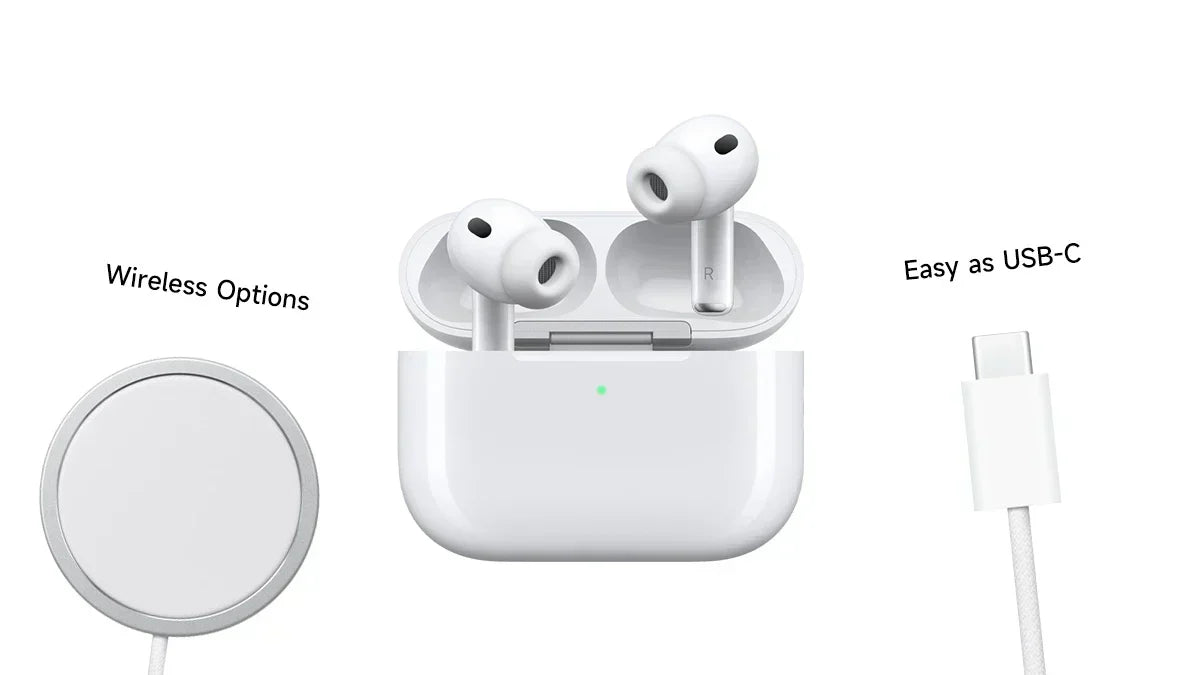
Modern AirPods can typically be charged in two ways:
- Wired charging
- Wireless charging
1. Wired Charging
Wired charging is the traditional and fastest way to charge your AirPods charging case.
Depending on your AirPods model, you may use either:
- A Lightning cable (AirPods 1, AirPods 2, AirPods 3, AirPods Pro 1st Generation, etc.)
- A USB-C cable (AirPods Pro 2nd Generation USB-C version, AirPods 4, and newer models)
Simply connect the charging cable to the AirPods charging case to recharge both the case and the earbuds.
Benefits of Wired Charging
- Faster charging speeds
- Higher charging efficiency
- Lower heat generation
- Ideal for quick top-ups before heading out
2. Wireless Charging
Many AirPods charging cases support Qi wireless charging and MagSafe charging.
With wireless charging, you simply place the charging case on a compatible wireless charger—no cables required.
Benefits of Wireless Charging
- More convenient
- Less wear on charging ports
- Cleaner desk setup
- Easy "drop-and-charge" experience
For users who keep AirPods on a desk, nightstand, or workspace throughout the day, wireless charging is often the most convenient solution.
Which AirPods Models Support Wireless Charging?
Technically, wireless charging support depends on the charging case, not the AirPods themselves.
AirPods Models with Wireless Charging Cases
- AirPods 2 (Wireless Charging Case version)
- AirPods 3
- AirPods Pro (1st Generation)
- AirPods Pro (2nd Generation)
- AirPods 4 (wireless charging versions)
It's important to note that AirPods 2 were sold with two different charging case options:
- Standard Charging Case (wired only)
- Wireless Charging Case
As a result, not every AirPods 2 model supports wireless charging.
If you're using an older model, such as AirPods 1, it's still possible to gain wireless charging functionality by replacing the original case with a compatible wireless charging case.
How Long Does It Take to Fully Charge AirPods?
Charging time can vary depending on the charging method, battery condition, and environmental temperature.
1. Charging the Case with a Cable
When the AirPods charging case is connected to power via Lightning or USB-C:
Charging Case Charging Time
- Approximately 30–60 minutes
- From 0% to 100%
Actual charging time may vary depending on the charger being used and the overall health of the battery.
2. Charging the Case Wirelessly
For AirPods models that support wireless charging:
Charging Case Charging Time
- Approximately 1–2 hours for a full charge
Wireless charging is generally slower than wired charging because:
- Wireless charging involves some energy loss
- Charging power is typically lower
- Thermal management may reduce charging speed
For most users, however, the difference is not significant during everyday use.
3. Charging the AirPods Inside the Case
In practice, AirPods are usually charged by placing them back into the charging case.
Earbud Charging Time
- Approximately 30–60 minutes
- From 0% to 100%
There's no need to wait until the earbuds are completely drained before recharging them. Simply placing them back in the case after use is the intended charging method.
What Is the Best Way to Charge AirPods?
Many users wonder:
- Does wireless charging damage the battery?
- Will frequent charging reduce battery life?
- Is wired charging better than wireless charging?
The good news is that AirPods include built-in battery management and charging optimization features. In real-world use, the difference between charging methods has far less impact on battery health than most people think.
The best choice depends on how you use your AirPods.
1. Need the Fastest Charging Speed? Choose Wired Charging.
If you often find yourself in situations like:
- Discovering your AirPods are dead before leaving home
- Needing a quick recharge before a meeting or flight
- Traveling frequently
Then wired charging is the best option.
Advantages
- Fastest charging speeds
- Highest charging efficiency
- Lower operating temperatures
This makes it ideal for users who need power as quickly as possible.
2. Want Maximum Convenience? Choose Wireless Charging.
If you use your AirPods every day, wireless charging often provides the best overall experience.
Advantages
- Simply set the case down to charge
- No cable plugging or unplugging
- Reduced wear on Lightning or USB-C ports
Keeping a wireless charger on your desk or nightstand means your AirPods are almost always topped up and ready to go.
For most users, wireless charging is the most convenient long-term solution.
3. For Everyday Use, Let the Charging Case Do Its Job.
From a battery health perspective, the best habit is simple:
Put your AirPods back in the charging case whenever you're done using them.
Benefits include:
- Maintaining a stable battery level
- Avoiding deep discharge cycles
- Reducing long-term battery wear
- Keeping your AirPods ready whenever you need them
Apple designed AirPods around this charging workflow. Rather than waiting until the earbuds are nearly empty, it's better to return them to the case regularly throughout the day.
4. So Which Method Is Best?
If you're looking for the best overall charging strategy:
For Daily Use
Charge the AirPods case with a Qi-certified or MagSafe-compatible wireless charger.
For Fast Power Recovery
Use a Lightning or USB-C cable when you need the quickest recharge possible.
Best Charging Habit
Return your AirPods to the charging case after every use.
This combination gives you the convenience of wireless charging while still allowing fast wired charging when necessary.

Conclusion
AirPods support both wired and wireless charging, although wireless charging availability depends on the charging case version.
For most users:
- Wired charging is the fastest option.
- Wireless charging is the most convenient option.
- Returning AirPods to the charging case after each use is the healthiest long-term charging habit.
If your AirPods case supports Qi or MagSafe charging, pairing it with a reliable wireless charger can help keep your earbuds powered up while minimizing cable clutter and everyday hassle.
FAQ
Do the AirPods Charging Lights Stay On While Charging?
Not necessarily.
When charging begins, the status light on the AirPods case typically illuminates for a few seconds to indicate charging status and then turns off automatically. This is normal behavior and does not mean charging has stopped.
As long as the AirPods remain connected to a charger or placed on a wireless charging pad, charging will generally continue even after the light turns off.
What Do the Different AirPods Indicator Lights Mean?
Green Light
A green light usually means the AirPods or charging case is fully charged or has plenty of remaining battery.
Amber Light
An amber light generally indicates that the AirPods or charging case is currently charging or has a low battery level.
No Light
No light may indicate:
- The charging case is in standby mode
- The charging case battery is completely depleted
Opening the lid or connecting a charger can help confirm the status.
Flashing Amber Light
A flashing amber light typically indicates:
- A pairing issue
- A connection error
- A reset process in progress
If the flashing continues, try repairing your AirPods.
Flashing White Light
A flashing white light means the AirPods are in pairing mode and ready to connect to an iPhone, iPad, Mac, or other Bluetooth device.
Can AirPods Be Overcharged?
No.
AirPods and their charging case include built-in battery management systems that automatically stop active charging once the battery reaches full capacity.
Even if the case remains connected to a charger, it will not continuously push power into the battery.
Apple also includes Optimized Battery Charging, which learns your charging habits and may delay charging beyond 80% until you actually need a full charge.
Because of this:
- You don't need to unplug AirPods immediately after reaching 100%.
- You don't need to manually stop charging at 80% or 90%.
- Normal charging behavior is perfectly safe.
Once the battery level naturally drops, charging will resume automatically as needed.
How Can You Check AirPods Battery Level?
The easiest way is through your iPhone or iPad.
You can check battery status by:
- Opening the AirPods case near your iPhone
- Using the Batteries widget on your Home Screen
- Going to Settings → Bluetooth → AirPods
These methods allow you to see both the earbuds' battery levels and the charging case's remaining power.
What Causes AirPods Battery to Drain Faster?
Several environmental and usage factors can affect AirPods battery life.
Extreme Temperatures
Very hot or very cold conditions can reduce lithium-ion battery efficiency.
Examples include:
- Leaving AirPods in a hot car during summer
- Using AirPods outdoors in freezing temperatures
Both situations can shorten battery runtime.
Active Noise Cancellation (ANC)
For AirPods Pro users, features such as:
- Active Noise Cancellation (ANC)
- Transparency Mode
consume additional power and can reduce overall battery life.
Frequent Phone Calls
Voice calls typically use more battery than music playback because the microphones remain active throughout the conversation.
Weak Bluetooth Connections
When your phone is far away or experiencing signal interference, AirPods may use more power to maintain a stable connection.
Battery Aging
Like all lithium-ion batteries, AirPods batteries naturally degrade over time.
Common signs include:
- Shorter listening time
- Faster charging cycles
- Quicker battery drain
This is a normal part of battery aging and expected over the lifespan of the product.


Leave a comment
This site is protected by hCaptcha and the hCaptcha Privacy Policy and Terms of Service apply.